


 City of Seattle Find It, Fix It Community Walks provide a unique opportunity for community members to identify neighborhood needs and discuss challenges directly with city leaders. The 6th annual walk will be held in the Crown Hill and Whittier Heights neighborhoods on Saturday, November 19th this year.
Participants can use the Find It, Fix It mobile app on the walk. This smartphone app offers mobile users one more way to report selected issues to the City. Make sure to download the app before the walk.
In fact, in partnership with Cities of Service, the City of Seattle will offer up to $5,000 in grants for community-led projects to each 2016 Find It, Fix It Walk neighborhood. The Crown Hill / Whittier Heights Community Project Grant Application will be available in seven languages at www.seattle.gov/finditfixit from November 10 to November 28.
For more information, contact Lemmis Stephens at 206.386.1907 or lemmis.stephens@seattle.gov or visit www.seattle.gov/finditfixit.
Crown Hill / Whittier Heights Find It, Fix It Community Walk
Date: Saturday, November 19th
Time: 10:30 a.m. to 12:30 p.m.
Meeting place: Baker Park, 8347 14th Ave NW, Seattle, WA 98117
Schedule
10:30 a.m. – 11:00 a.m.
- Sign-in at Baker Park and enjoy refreshment provided by Starbucks
- The Mobile Customer Service Center will be on site at Baker Park to provide services and information prior to the walk.
11:00 a.m. – 11:15 a.m.
- Welcome remarks from Mayor Ed Murray
11:15 a.m. – 12:15 p.m.
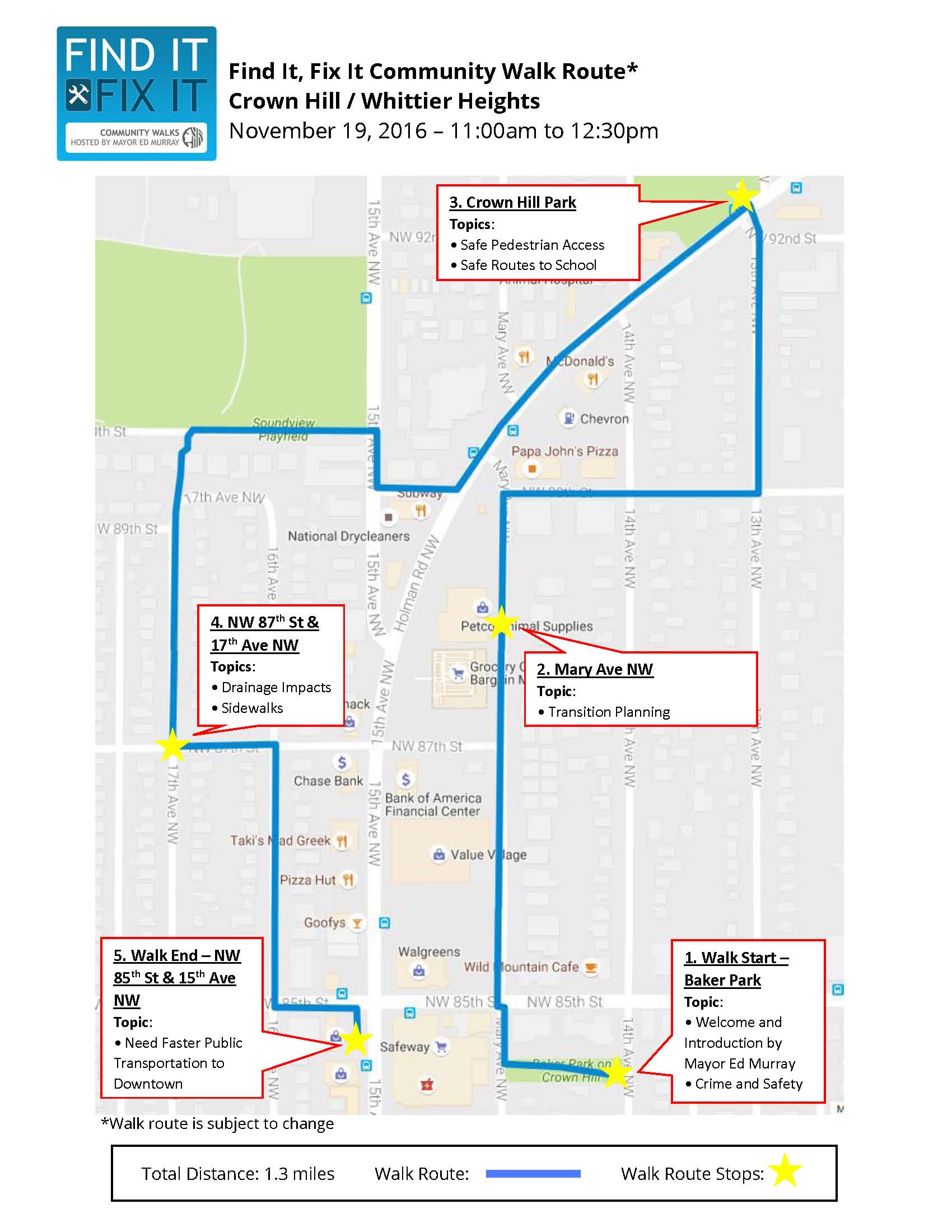
Walk will follow this route (map):
- North on Mary Ave NW
- North on 13th Ave NW
- Southwest on Holman Rd NW
- West on NW 90th St
- South on 17th Ave NW
- East on NW 85th St
12:15 p.m. – 12:30 p.m.
Walk concludes at NW 85th St and 15th Ave NW
Department representatives and City staff available for follow-up questions
About Find It, Fix It – service request mobile app
“Find It, Fix It” is a smartphone app offering mobile users one more way to report selected issues to the City of Seattle.
With Find It, Fix It, reporting an issue is as easy as snapping a photo with your smartphone, adding detailed information, and hitting submit. The map’s “drag and drop” feature or the phone’s own technology can be used to pinpoint the location.
The app is available both from the Google Play Store and Apple App Store. Once downloaded the mobile app, mobile users can submit feedback using the app’s “other inquiry” category, found under the “New Request” icon.
The app offers the following service request categories:
- Abandoned Vehicle: report vehicles parked in a public right-of-way more than three days.
- Graffiti Report: report graffiti, including what it is on — parking meter, utility pole or building — so it gets automatically routed to the appropriate department for response.
- Illegal Dumping: report illegal dumping — junk, garbage or debris — on public property, including roadsides, open streets and paved alleys.
- Parking Enforcement: make an inquiry regarding a parking concern.
- Pothole: report a pothole.
- Sign and Signal Maintenance: report damaged street signs and malfunctioning traffic signals.
- Streetlight Report: report a streetlight outage or damaged streetlight.
- Other Inquiry: this miscellaneous category is for making an inquiry or request not listed above, which will be processed by the City’s Customer Service Bureau. Mobile users should choose this category to provide feedback.